Voice typing in English and TurkishYou talk. Yazgo writes.
in WhatsAppin your emailin your notesin ChatGPTin searchin WhatsApp, in your email, in your notes, in ChatGPT, in search.
Tap Speak wherever a keyboard opens and say it your way. Yazgo takes out the ums, adds the punctuation and keeps each word in the language you said it in: English, Turkish, or both in one sentence.
Plan a three day trip to Istanbul for my parents. Annemle babam çok yürümeyi sevmiyor, so keep it relaxed.
Listening0:04
9:41
Family
Are you free tonight?
Hi Mom, we're coming over tonight. We'll bring dessert.
Speak
Undo
Speak
Cancel
Finish0:07
Writing…
qwertyuiop
asdfghjkl
zxcvbnm
123Yazgo
9:41
Reply
Hi Sarah, thanks for the quick reply. I'm free Thursday at 2. I'll send the agenda tomorrow. Best, Ayşe
Speak
Undo
Speak
Cancel
Finish0:07
Writing…
qwertyuiop
asdfghjkl
zxcvbnm
123Yazgo
WhatsApp on iPhone, Claude on Mac, Gmail on Android. What Yazgo writes in each: WhatsApp: “Hi Mom, we're coming over tonight. We'll bring dessert.” Claude: “Plan a three day trip to Istanbul for my parents. Annemle babam çok yürümeyi sevmiyor, so keep it relaxed.” Gmail: “Hi Sarah, thanks for the quick reply. I'm free Thursday at 2. I'll send the agenda tomorrow. Best, Ayşe”
What Yazgo does
Talk instead of typing. Say it the way it comes, ums and uhs included. Yazgo takes them out and puts the commas and periods in. Switch to Turkish in the middle of a sentence, sorun değil. It all lives in your keyboard. Go where you were about to type and tap Speak
If a keyboard opens, Yazgo is there.
Nothing to set up app by app. Yazgo lives in your keyboard, so it comes with you into whatever you open.
Works in supported apps and text fields: not in password fields, or in the few apps that don't allow other keyboards. The logos are their owners' trademarks; Yazgo is not affiliated with these companies.
In the places you already type.
Pick an app. See what was said, then what Yazgo wrote. Every result here is real output, word for word.
You say
um hi mom we're coming over tonight uh we'll bring dessert
The ums and uhs go. Periods, commas and capitals come in.
1Tap Speak
2Say what's on your mind
3The text lands where you were typing
WhatsApp, Text your family. You say: “um hi mom we're coming over tonight uh we'll bring dessert”. Yazgo writes: “Hi Mom, we're coming over tonight. We'll bring dessert.”.
Google, Search out loud. You say: “flights london to istanbul november twenty third morning”. Yazgo writes: “Flights London to Istanbul November 23 morning”.
ChatGPT, Ask for a draft. You say: “write an email to the client saying the delivery will be friday no wait monday keep it polite but clear”. Yazgo writes: “Write an email to the client saying the delivery will be Monday, keep it polite but clear.”.
Claude, Plan a trip. You say: “plan a three day trip to istanbul for my parents annemle babam çok yürümeyi sevmiyor so keep it relaxed”. Yazgo writes: “Plan a three day trip to Istanbul for my parents. Annemle babam çok yürümeyi sevmiyor, so keep it relaxed.”.
Gemini, Say an agenda. You say: “meeting agenda first the budget second the deadline third our new teammate”. Yazgo writes: “Meeting agenda: 1. The budget 2. The deadline 3. Our new teammate”.
Instagram, Leave a comment. You say: “this looks amazing I'm trying the recipe on saturday no wait sunday”. Yazgo writes: “This looks amazing. I'm trying the recipe on Sunday.”.
Gmail, Reply to an email. You say: “hi sarah thanks for the quick reply um I'm free thursday at two I'll send the agenda tomorrow best ayşe”. Yazgo writes: “Hi Sarah, thanks for the quick reply. I'm free Thursday at 2. I'll send the agenda tomorrow. Best, Ayşe”.
The browser demo takes one language per message. To mix English and Turkish in one message, use the app.
9:41
Family
Are you free tonight?
Hi Mom, we're coming over tonight. We'll bring dessert.
Speak
Undo
Speak
Cancel
Finish0:07
Writing…
qwertyuiop
asdfghjkl
zxcvbnm
123Yazgo
Are you free tonight?
Why Yazgo
Türkiye has always written by talking.
1960s
The petition writer sat outside the post office with his typewriter. You told him the story; he wrote it properly.
1978
Families in Germany filled cassette tapes instead of writing letters.
2013
Voice messages arrived. Easy, but the words still flew away: to find one again, you listen to it all over.
Today
You still say it. This time the writing stays, in your own words.
Spoken words fly away; written words remain.
The name is half Turkish, half English: “yaz” means “write”, and “go” means go. Say it YAHZ-go. Yazgo is an independent product by Bekir, a Turkish founder who does most of his own dictating in English.
Two languages
English, Turkish, or both in one sentence.
Switch between English and Turkish mid-sentence, whether you're writing to your team or your family. Yazgo keeps each word in the language you said it in. It never translates.
English+Türkçe
You say
tell everyone müşteri çok beğendi we'll talk at the office tomorrow
Yazgo writes
Tell everyonemüşteri çok beğendi. We'll talk at the office tomorrow.
The Turkish part: “The client loved it.”
Each word in the language you said it in
English stays English. Turkish stays Turkish. Nothing is translated.
Two languages for now
English and Turkish. Speak either one, or switch between them mid-sentence.
9:41
My words
4 words
Gülsüm
Ayşe
Sarah
Istanbul
Aunt , come over tomorrow evening.
Try it: tap the wrong word
Which is right?
Learned. Next time it writes “Gülsüm”.
Your next message
Aunt Gülsüm called, she says hello.
My words
Teach Yazgo your words.
Did Yazgo get a name wrong? Use Fix in History to save the right spelling, and Yazgo can use it in later dictations. You can also add names, brands and jargon straight to My words.
Notes
Say what's on your mind. It's a note.
A shopping list, a meeting agenda, the idea you had at midnight: open Yazgo, tap Speak and say it. Your note is written with the punctuation in place. Search for it later, and pin the ones that matter. Notes stay until you delete them.
9:41
Notes
Search notes
Pinned
Meeting agenda: 1. The budget 2. The deadline 3. Our new teammate
Written by voice
Flights London to Istanbul November 23 morning
Written by voice
This looks amazing. I'm trying the recipe on Sunday.
Written by voice
Write an email to the client saying the delivery will be Monday, keep it polite but clear.
Written by voice
9:41
Notes
Meeting agenda: 1. The budget 2. The deadline 3. Our new teammate
Written by voice
Speak
Gmail
Hi Sarah, thanks for the quick reply. I'm free Thursday at 2. I'll send the agenda tomorrow. Best, Ayşe
Listening0:04
hold
speak
let go
Mac
On Mac: hold a key, talk, let go.
While you talk, a small pill appears on screen and its orange bars move with your voice. Let go, and the text is written where your cursor is: an email, a document, a chat box.
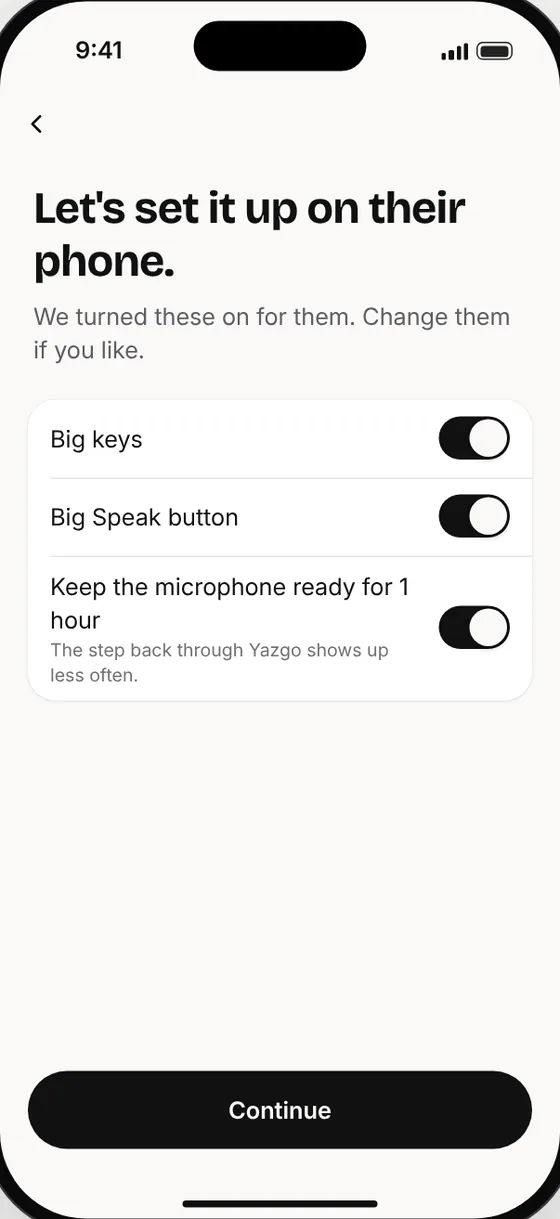
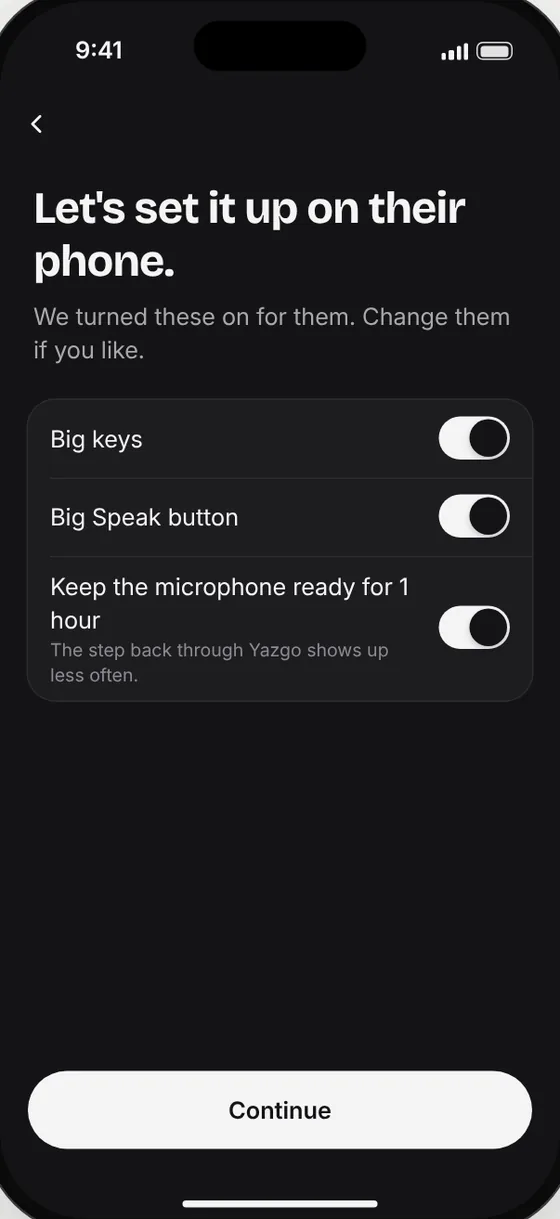
If typing “OK” in the family chat takes a full minute, this one is for them. Send the link and set it up together. Yazgo shows every step on screen. After that, there's a big Speak button.
Your voice is recorded and sent only when you tap Speak (or hold your talk key on Mac). On iPhone the microphone may stay on for a while so the keyboard is ready; nothing is recorded until you tap.
Where it goes
Over a secure connection to our servers and the services that turn it into clean text. It isn't processed on your phone.
What happens to recordings
Once your voice is turned into text, we don't keep the recording on our servers. The speech service may keep it for a limited time to prevent abuse.
Yours to delete
The words and fixes you teach Yazgo are kept for you. Delete them any time. A fix that many people make also helps Yazgo for everyone, without your name on it.
Your typing stays yours
What you type with the keys isn't sent anywhere on its own. The one exception: when you fix a word Yazgo just wrote, that text and your fix go to Yazgo so it can learn the word. To learn, only the changed words are kept.
Yazgo in short
Yazgo is a voice typing app. On your phone it works as a keyboard: tap Speak, talk the way you talk, and Yazgo writes clean, ready-to-send text with the punctuation and capitals in place.
What it does
Turns what you say into text. Adds the punctuation and capitals itself. Takes out the ums and uhs. When you correct yourself it writes only the final version, and the things you list come out as a list. It learns the names and words you correct.
Where
As a keyboard on iPhone and Android: in email, Slack, WhatsApp, notes and most apps where a keyboard opens. On Mac, a menu-bar app that writes wherever your cursor is.
Languages
English and Turkish. Speak either one, or both in one message.
Price
Outside Türkiye: $9.99 a month. Talk up to 20 hours a month (about 40 minutes a day). Prices in Türkiye are on the Turkish page.
Trial
A 7-day free trial through the App Store or Google Play. It renews into the monthly plan unless you cancel at least 24 hours before it ends. Cancel anytime.
Download
For iPhone from the App Store, for Android from Google Play, and for Mac from this page.
Your voice
It travels over a secure connection to the servers that turn it into text. It is not processed on your phone, so it needs an internet connection.
Who it's for
People who type all day (email, Slack, texts, notes) and would rather talk than type, on their phone and their Mac, in English, Turkish or both.
Made by
Bekir makes Yazgo. The company is Ayabak LLC (USA). Contact: [email protected]
Questions
Where do I get it?
On iPhone, from the App Store. On Android, from Google Play. The Mac app is a download from this page.
How is it different from my phone's built-in dictation?
Yazgo cleans up as it writes. It takes out the ums, keeps only your final version when you correct yourself, lays out lists and writes numbers as digits. You can mix English and Turkish in one sentence, and each word stays in the language you said it in. And it learns the names and words you teach it. The examples above are real output.
Which apps does it work in?
On iPhone and Android, Yazgo is a keyboard, so it works in most apps you type in: email, Slack, WhatsApp, Messages, notes and AI chats. Password fields and the few apps that don't allow other keyboards are the exceptions. On Mac, the text appears wherever your cursor is.
Does Yazgo translate?
No. Yazgo writes what you say, in the language you say it in. Switch languages mid-sentence and each word stays where you put it.
Which languages can I speak?
English and Turkish. Speak either one, or both in one message, and each word stays in the language you said it in. In both languages Yazgo takes out the ums, keeps your corrections and lays out your lists.
Does it need the internet?
Yes. Your voice is turned into text online, so you need Wi-Fi or mobile data.
What happens to my voice?
It's sent over a secure connection to our servers and the services that turn it into clean text. Once it's text, the recording isn't kept on our servers; the speech service may keep it for a limited time to prevent abuse. The texts Yazgo writes for you stay in your account's history for 90 days, so you can find them again; you can switch history off or delete them. The words and fixes you teach Yazgo are kept for you, and you can delete them any time. A fix that many people make also helps Yazgo for everyone, without your name on it.
How much does it cost?
A 7-day free trial through the App Store or Google Play. It renews into the monthly plan unless you cancel at least 24 hours before it ends. Cancel anytime. The monthly plan is $9.99 a month, and you can talk up to 20 hours a month (about 40 minutes a day). There's also a fair-use cap of 300 dictations a day.
What if I cancel during the trial?
If you cancel at least 24 hours before it ends, you aren't charged. You cancel in the App Store or Google Play, like any subscription.
Is there a Windows app?
Not yet. iPhone, Android and Mac come first.
What does Yazgo mean?
Half Turkish, half English: “yaz” means “write”, and “go” means go. Say it YAHZ-go.
Waitlist
Get an email when Yazgo is ready for your phone.
Leave your email and pick your devices. We'll write when Yazgo is ready for them, and only about the launch.